How to Downgrade EVERY Version of GTA III
Warning
This guide IS NOT for Grand Theft Auto: III - The Definitive Edition which released in 2021. This guide is ONLY for the original Grand Theft Auto: III released in 2002.
The only reason you should downgrade GTA III is if you want to mod the game. If you're not going to mod, you should stick with the latest version of GTA III.
Introduction#
Depending on the copy of GTA III you have, downgrading may be different, so this guide will be split into different sections for the Steam, Rockstar Games Launcher and DVD copies of the game. Press one of the links below to be taken to the section of the guide for whichever copy you have.
Downgrading the Steam Version of GTA III#
Warning
Make sure you launch Grand Theft Auto: III at least once on Steam before downgrading. If you don't do a first time launch before downgrading, Steam will possibly update GTA III and undo the downgrader!
- Download the TJGM GTA III Downgrader from either Mega or Mediafire.
-
Open your
Grand Theft Auto 3folder. You can find this by right clickingGrand Theft Auto: IIIin your Steam library, go toManageand then clickBrowse local filesfrom the menu. You should see the GTA III files like this.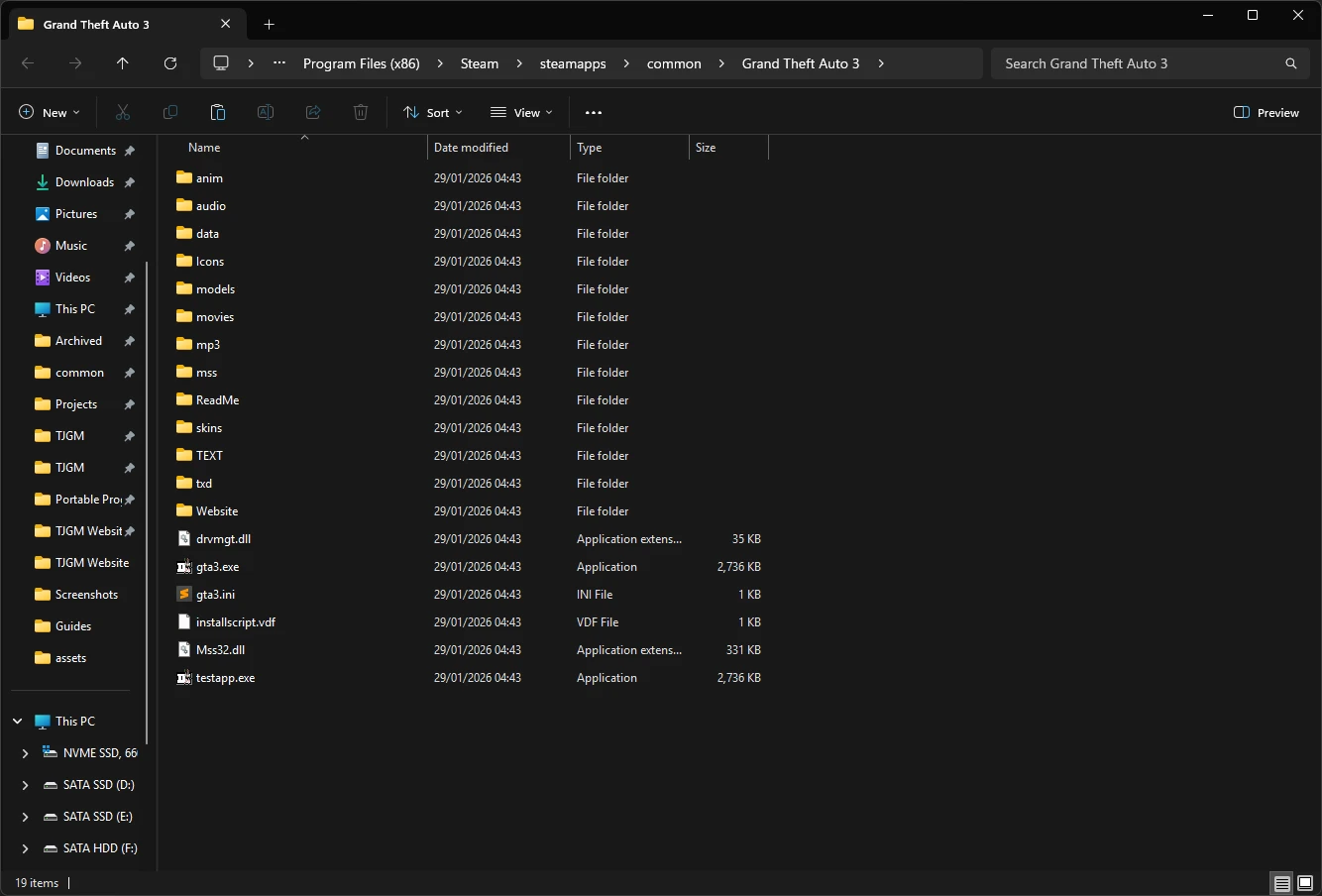
-
Open the
TJGM GTA III Downgrader.ziparchive you downloaded and copygta3.exefrom the archive, into theGrand Theft Auto 3folder. Replacegta3.exewhen asked.
The Steam version of GTA III is now downgraded, however unlike Vice City and San Andreas, GTA III will throw an error once you launch it asking you to insert a CD. You can fix this by installing SilentPatch, a mod which fixes a huge number of issues with GTA III. Let's quickly do it.
- Download the latest SilentPatchIII .zip from the official GitHub release page (found under
Assets). - Open the SilentPatch archive you downloaded and copy
SilentPatchIII.asiandSilentPatchIII.inifrom the archive, into theGrand Theft Auto 3folder.
And that's it, the Steam version of GTA III is now downgraded.
If you have any other questions, check out the Questions & Answers section.
Tip
If Rockstar for some reason ever updates the Steam version of GTA III again, it will revert the downgrader and if you have mods installed, it will break your mods. It's very unlikely they'll update GTA III now as it's no longer for sale on Steam, but there's still a very small possibility.
So you have two options.
-
Option A: You take the really small risk and continue to launch GTA III through Steam.
-
Option B: You rename your GTA III folder to literally anything else so Steam will no longer detect it. The downside to this is, you won't be able to launch the game through Steam, but instead you can launch the game by clicking
gta3.exe.
It's up to you really. Neither will have any impact on your playing experience and this is mostly just a precaution.
Downgrading the Rockstar Games Launcher Version of GTA III#
Warning
Rockstar Games Launcher restricts your ability to modify game files without administrator approval. This is a problem because some mods will need to change files as you play, and unless you run the game as an admin, which I really wouldn't recommend, mods won't work correctly.
Along with that, Rockstar Games Launcher will also update your game anytime files are modified, undoing your changes. This will also reset permissions on the games folder even if you change it.
The best solution to these issues is to simply copy your GTA III folder, and paste it somewhere where administrator approval isn't required. This will be our first steps.
-
Open your
Grand Theft Auto 3folder. You can find this by clicking onSettingsin the Rockstar Games Launcher, clickGrand Theft Auto IIIin your installed games list, findView installation folderand then clickOpennext to it. You should see the GTA III files like this.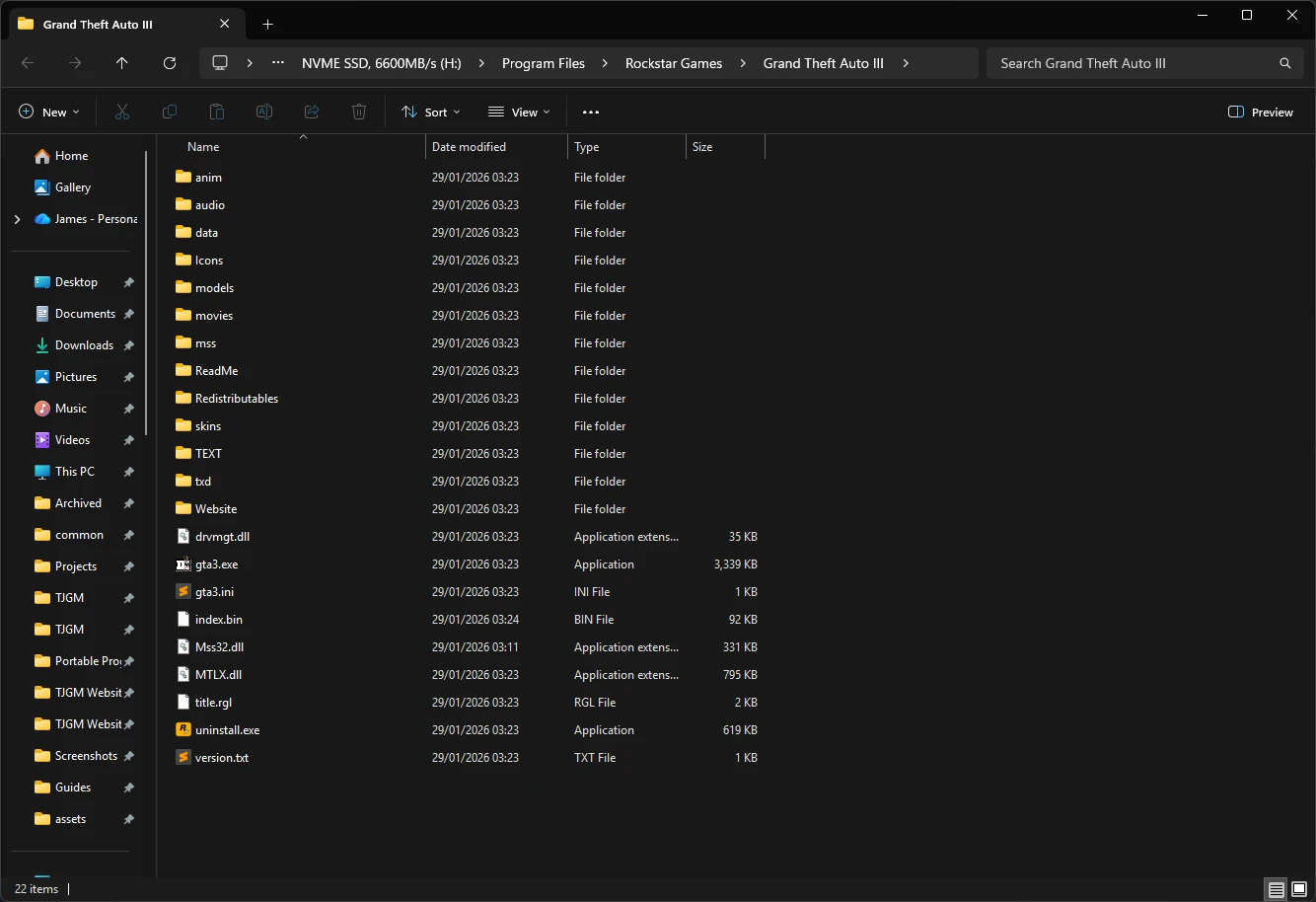
-
In the File Explorer address bar, click on
Rockstar Gamesto go just outisde theGrand Theft Auto IIIfolder and then copy and paste yourGrand Theft Auto IIIfolder to another location on your PC. I'd recommend copying the game to a generic games folder outside ofProgram Files, or on another drive.Warning
Make sure you copy and paste the game, don't cut and paste it. Cutting and pasting the game will carry over the restrictive permissions from Rockstar Games Launcher, which you don't want.
-
Check if you can modify the pasted game folder without admin approval. You can check this by right clicking anywhere in your game folder, go to
Newin the context menu, and if the option to create a new folder hasn't got the little shield icon next to it, you're all set to go.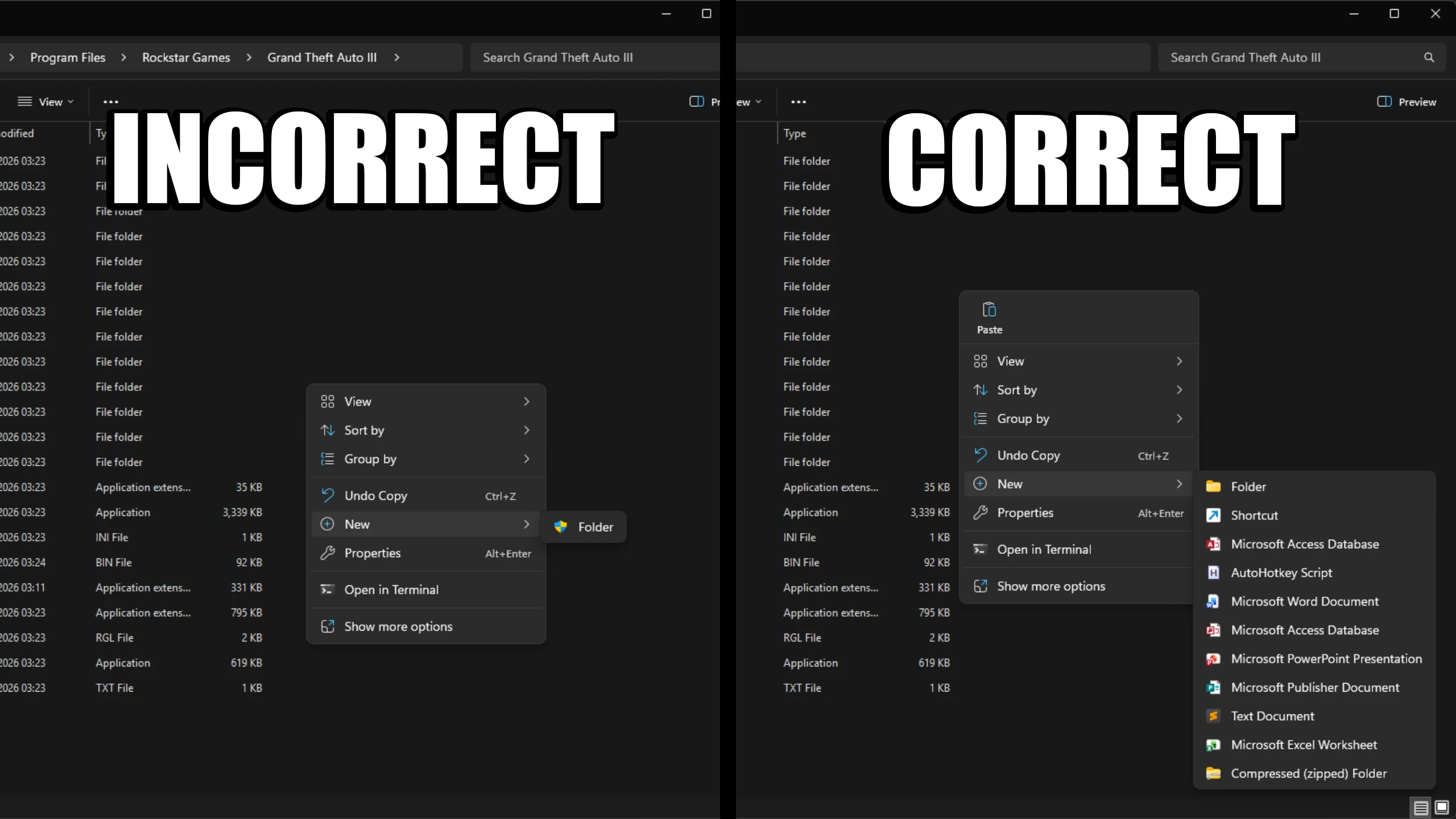
If you still have the shield icon next to the new folder option, copy the game folder again and paste it somewhere else on your system that isn't as restrictive.
-
Download the TJGM GTA III Downgrader from either Mega or Mediafire.
- Open the
TJGM GTA III Downgrader.ziparchive you downloaded and copygta3.exefrom the archive, into theGrand Theft Auto IIIfolder. Replacegta3.exewhen asked.
The Rockstar Games Launcher version of GTA III is now downgraded, however unlike Vice City and San Andreas, GTA III will throw an error once you launch it asking you to insert a CD. You can fix this by installing SilentPatch, a mod which fixes a huge number of issues with GTA III. Let's quickly do it.
- Download the latest SilentPatchIII .zip from the official GitHub release page (found under
Assets). - Open the SilentPatch archive you downloaded and copy
SilentPatchIII.asiandSilentPatchIII.inifrom the archive, into theGrand Theft Auto IIIfolder.
And that's it, your Rockstar Games Launcher copy of GTA III is now downgraded. You can launch GTA III by clicking gta3.exe.
If you have any other questions, check out the Questions & Answers section.
Tip
You can delete your original Rockstar Games Launcher copy of the game to save space on your PC.
Downgrading the DVD Version of GTA III#
- Install GTA III from the DVD onto your PC. When installing, make sure YOU DON'T install the game in Program Files, I'd recommend installing it in a generic games folder outside of Program Files, or on another drive entirely. Remember exactly where you install GTA III and when the game is installed, open the GTA III folder.
- Download the TJGM GTA III Downgrader from either Mega or Mediafire.
- Open the
TJGM GTA III Downgrader.ziparchive you downloaded and copygta3.exefrom the archive, into theGrand Theft Auto 3folder. Replacegta3.exewhen asked.
The DVD version of GTA III is now downgraded, however unlike Vice City and San Andreas, GTA III will throw an error once you launch it asking you to insert a CD. You can fix this by installing SilentPatch, a mod which fixes a huge number of issues with GTA III. Let's quickly do it.
- Download the latest SilentPatchIII .zip from the official GitHub release page (found under
Assets). - Open the SilentPatch archive you downloaded and copy
SilentPatchIII.asiandSilentPatchIII.inifrom the archive, into theGrand Theft Auto IIIfolder.
And that's it, your DVD copy of GTA III is now downgraded. After downgrading, you don't need the DVD to launch the game anymore. You can launch GTA III by clicking gta3.exe.
If you have any other questions, check out the Questions & Answers section.
Questions and Answers#
What is the difference between your downgrader and others?#
Unfortunately downgraders have been a bit of a mess in the GTA community, overcomplicating the downgrading process. So I've made mine as simple as possible.
Some downgraders come as actual installers, however these often have issues on certain systems or require admin permission to work. There's also downgraders that come with mods prepacked, however this is an issue as the mods can often be outdated OR users will get these mods from these overcomplicated downgraders, not realise what they have installed, then when they mod the game themselves, they reinstall the same mods, causing issues with their game.
Lastly, a lot of downgraders simply come with the wrong .exe, as there's several 1.0 exe's from different regions. My downgrader comes with the most mod compatible .exe.
Enjoy my work?
Gain benefits such as shout-outs at the end of videos, early access to TJGM videos, early access to TJGM mods, VIP Discord access and much more by supporting me and my work on Patreon, it's very much appreciated! ❤️
⭐ Support on Patreon